DOD Smart Health Kiosk

Made in India | India's #1 AI Powered | Digital Swasthya Kendra

AI-powered health kiosk with 12-lead ECG, BP, blood sugar, vision & live doctor consultation.

Risk Prediction
🫀 ECG 🩸 BP & Sugar 👁️ Vision Test 🫁 PFT 🩺 Telemedicine 🤖 AI Nutrition 🇮🇳 Made in India
0 +
Installations
0 /7
Support
0 +
DOD Certified Doctors
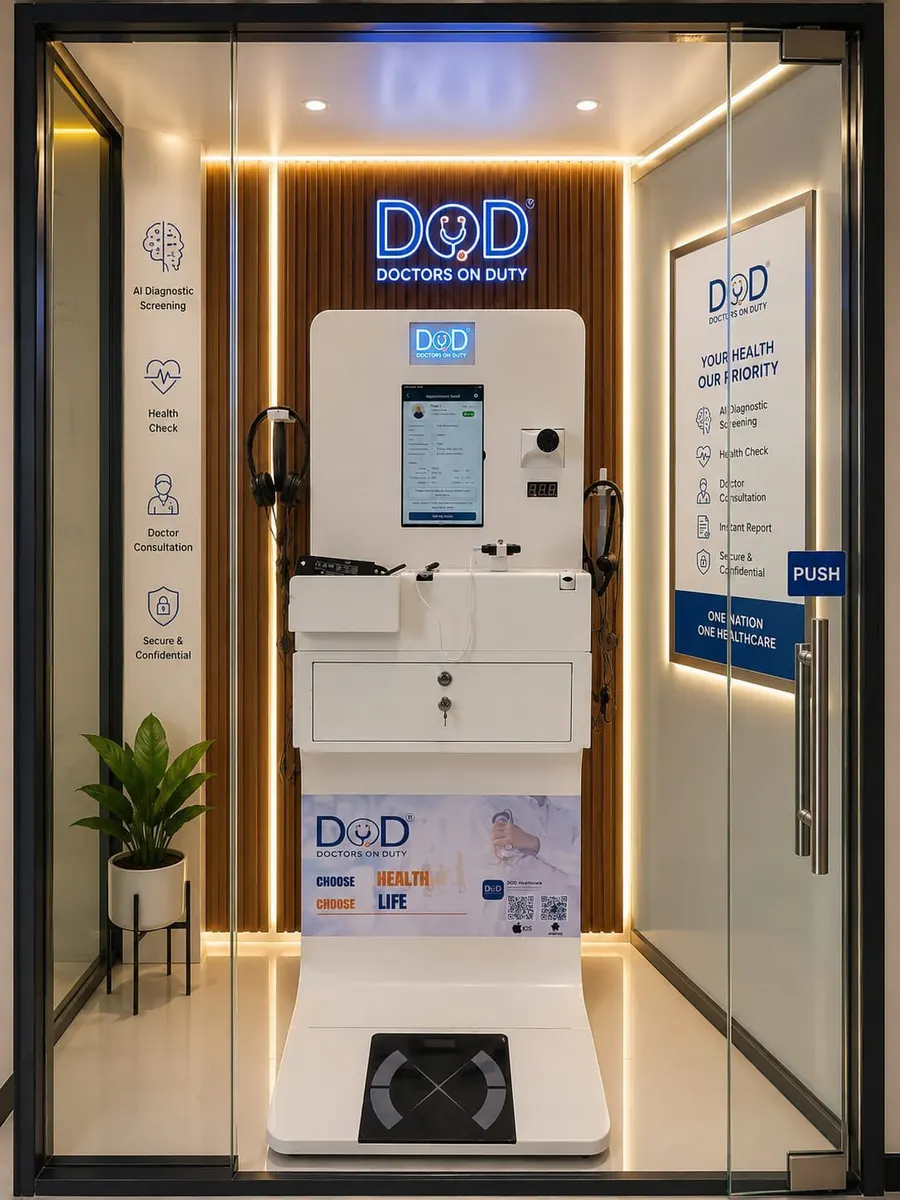
DOD Health Kiosk touch-screen interface showing ECG, BP, vitals & video consultation - Made in India
Smart Diagnostics
Real-time Analytics
Secure Data
Documentation

DOD Kiosk User Manual

Step-by-step guide to using every feature of your Digital Swasthya Kendra

01
Approach & Wake the Kiosk
Walk up to the DOD Health Kiosk and tap anywhere on the screen to wake it from standby mode.
Touch Screen
02
Select Your Language
Choose your preferred language from the home screen. The entire interface - menus, reports, instructions - switches instantly.
Multi-Language
03
Enter Your Mobile Number
Type your 10-digit mobile number on the keypad. New users are automatically registered; returning users are recognised instantly.
Secure Login
04
Verify with OTP
A one-time password is sent to your mobile within seconds. Enter it on screen to verify your identity and access your health profile.
OTP Verified
05
Choose a Service & Begin
The main menu displays all available tests and consultations. Tap any service - on-screen instructions guide you through each step automatically.
AI Guided
ECG
12-lead heart monitoring
Blood Pressure
Systolic & diastolic
Blood Sugar
Random glucose test
Digital Stethoscope
Heart & lung sounds
Vision Test
Eye & colour blindness
Lung Function
PFT pulmonary test
Health Report
Instant full report
Nutrition Plan
AI personalised diet
Video Consult
Live specialist doctor
Prescription
Download & print
Body Composition
AI analysis report
Appointment
Book & manage slots
Sit quietly for 2 minutes before any vitals test to ensure accurate readings.
Remove tight sleeves from your upper arm before the BP cuff test.
Do not eat or drink 30 minutes before the blood sugar (glucometer) test.
Keep your hands relaxed and steady during ECG electrode attachment.
Use the earphones provided in the kiosk for teleconsultation audio clarity.
Always log out after your session - your health data is private and encrypted.

Complete PDF User Manual

Full technical guide with diagrams, device usage & troubleshooting reference.

Advanced Features

AI-driven technology designed for modern healthcare environments

Kiosk Features & Medical Devices
Video consultation with real specialist doctors
ECG Machine (Sensor Based)
Digital Stethoscope
Inbuilt Glucometer (Random Blood Sugar)
Vision Test Tool
Colour Blindness Assessments
Instant Health Report
AI Generated Clinical Risk Prediction Model
Personalised AI-based Nutrition Plan
Auto Medical Record Maintenance & Real Time Data Transfer
Vitals Monitoring
Temperature (non-contact digital thermometer)
Blood Pressure Monitor (Systolic & Diastolic)
Heart Rate
Oxygen Saturation (SpO2)
BMI Monitor
Height & Weight Scanner

AI Full-Body Health Scan

AI Generated - Body Composition Analysis
Extra Cellular Water
Intra Cellular Water
Basal Metabolic Rate
Visceral Fat
Waist Height Ratio
Fat %
Minerals
Waist Hip Ratio
Body Cell Mass
Skeletal Muscle Mass
Muscle Mass
Bone Mineral Content
Step-by-Step Guides

How to Use the DOD Kiosk

Simple instructions for every key feature - anyone can use it in minutes

01

How to do ECG

  1. Select ECG Test on the home screen
  2. Attach the ECG electrode pads as shown on-screen diagram
  3. Sit still and breathe normally for 30 seconds
  4. View your 12-lead ECG result instantly on screen
  5. Download or print your ECG report
Watch Video
02

How to do BP Monitoring

  1. Select Blood Pressure from the main menu
  2. Slide your arm into the BP cuff on the kiosk
  3. Sit upright, feet flat, and relax for a moment
  4. Press Start - cuff inflates automatically
  5. Systolic, diastolic and heart rate shown on screen
Watch Video
03

How to use Digital Stethoscope

  1. Select Stethoscope from the device menu
  2. Pick up the digital stethoscope from the dock
  3. Place the chest piece on your chest as directed
  4. Stay still while heart & lung sounds are recorded
  5. Doctor hears the sounds live during teleconsult
Watch Video
04

How to Download Your Prescription

  1. Complete your consultation with the doctor
  2. Go to My Reports on the home screen
  3. Select the consultation date to view your prescription
  4. Tap Download PDF or Print
  5. Scan the QR code to get it on your phone instantly
Watch Video
05

How to Book Consultation with Doctors

  1. Tap Book Appointment on the main menu
  2. Select speciality and preferred doctor
  3. Choose available date and time slot
  4. Confirm with your mobile number (OTP verification)
  5. Receive confirmation and reminder on your phone
Watch Video
DOD In Action

See the Kiosk Live

Real demonstrations of DOD Health Kiosk features and capabilities

Watch & Learn

DOD Kiosk in Action

See exactly how it works - from health checkup to booking your doctor

Machine Demo

How to Use the DOD Health Kiosk

Complete walkthrough - health checkup, vitals, ECG, and more.

Consultation Guide

How to Book Consultation with Doctors

Step-by-step guide to booking your teleconsultation through the kiosk.

Ideal For

Who Benefits Most

The DOD Health Kiosk is designed for spaces where healthcare must come to the people

Corporate Offices
Work Spaces
Hotels
Resorts
Factories
Hostels
Old Age Homes
Schools
Colleges
Government Spaces
Public Areas
Trusted Partners

Brands & Collaborations

Partnering with leading healthcare organizations and technology providers

0 Healthcare Facilities
0 Strategic Partners
0 States Across India
Validations & Accreditations

Certifications & Recognitions

Backed by Government of India initiatives and certified quality standards

In the News

DOD in the Media

Latest coverage and updates about our healthcare revolution

Our Story

About DOD —
Our Journey

Amazemedics Pvt. Ltd.

Vision

DOD envisions a future where healthcare is accessible, convenient, and empowering for everyone - regardless of location or circumstance. We strive to create a seamless ecosystem that bridges the gap between patients and providers, fostering proactive health management and exceptional care delivery.

Values

We - DOD Doctors On Duty - value patient-centered care, placing you at the core. Our solutions empower you to manage your health and access quality care on-demand. We're committed to pushing boundaries to improve healthcare for all.

01
Patient-Centered Care Placing patients at the core of everything we do
02
Innovation Pushing boundaries to improve healthcare for all
03
Empowerment Providing tools for health management and efficient workflows
04
Quality & Security Encrypted environments to safeguard your information
05
Accessibility Ensuring healthcare reaches everyone, everywhere
“Choose Health, Choose Life”

Empowering Bharat with Digital Healthcare — With an Integrated & Seamless Healthcare Ecosystem.

Digital Swasthya Kendra · DOD Health Kiosk · Healthcare in the Hands of Every Citizen

Meet Our Leadership Team

Our Experienced Professionals Are Dedicated To Delivering Excellence, Innovation, And Outstanding Results For Our Clients.

Get In Touch

Connect With Us

Let's discuss how we can transform healthcare in your community

Contact Information
General Inquiries
Location
Greater Noida, Uttar Pradesh, India
Send Us a Message
By submitting, you agree to be contacted regarding DOD solutions.
Find Us
Greater Noida, Uttar Pradesh, India

DOD Healthcare

Typically replies instantly

Hello!

How can we help you with DOD Health Kiosk?